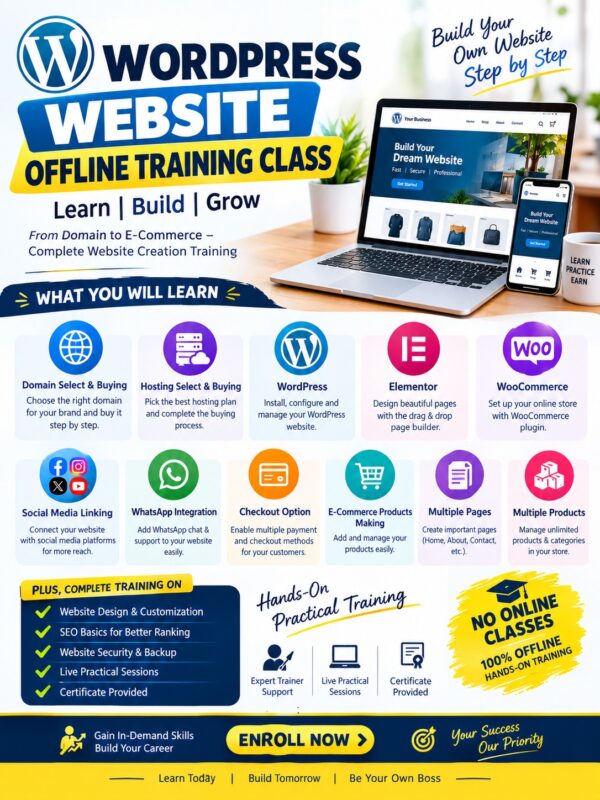



WordPress Website Offline Training Class – Learn, Build, Grow (Offline + online Class (5 days))
Build Your Own Website & Start Your Online Business!
🚀 Course Highlights
-
🎓 100% Offline Hands-On Training: No online recordings—learn directly in a classroom environment.
-
🛠️ Complete Practical Sessions: Build live projects as you learn.
-
👨🏫 Expert Trainer Support: Get personalized guidance and instant doubt resolution.
-
📜 Certificate Provided: Earn a course completion certificate to boost your career or resume.
-
🤝 After Training Support: Ongoing guidance to help you manage and grow your website after the course.
📚 What You Will Learn (Modules Covered)
-
Domain Selection & Buying: Choose the right domain name for your brand.
-
Hosting Selection & Buying: Set up reliable, fast hosting for your site.
-
WordPress Setup & Management: Learn complete installation, navigation, and core configurations.
-
Elementor Page Builder: Design stunning, custom landing pages easily without coding.
-
WooCommerce Integration: Turn your site into a fully functional online shop.
-
Social Media Integration: Connect your social profiles directly to your web presence.
-
WhatsApp Integration: Add instant chat/support links to receive queries directly on your phone.
-
Checkout & Payment Options: Integrate secure payment gateways and smooth checkout flows.
-
E-Commerce Product Setup: Easily upload, manage, and showcase physical or digital products.
-
Multiple Pages Creation: Create core essential pages (Home, About Us, Contact Us, Services, etc.).
-
Multiple Products & Categories: Organize and manage unlimited product listings with categories.
🌐 WordPress Website – Online Training Course
Domain Name Selection & Registration
– Choosing the right domain name
– Checking domain availability
– Domain registration and purchase
– Basic domain settings and configuration
Web Hosting Selection & Purchase
– Understanding different types of web hosting
– Selecting the right hosting plan
– Purchasing web hosting
– Connecting domain with hosting
WordPress Installation & Initial Setup
– WordPress installation
– Basic website settings and configuration
– WordPress admin dashboard management
– User roles and essential website settings
WordPress Theme & Website Structure
– Professional theme selection
– Header, footer and navigation setup
– Website layout and structure creation
– Basic website customization
Elementor Page Builder – Complete Training
– Complete website designing with Elementor
– Sections, containers and columns
– Text, image, video and icon elements
– Responsive design for mobile, tablet and desktop
Professional Website Page Creation
– Home Page
– About Us Page
– Services Page
– Contact Us Page
– Product / Shop Pages
– FAQ and other required pages
WooCommerce – Complete E-Commerce Setup
– WooCommerce installation and configuration
– Shop and product page setup
– Product categories and sub-categories
– Simple and variable products
– Product pricing, images and descriptions
– Multiple product management
Unlimited Page & Product Creation
– Creating multiple website pages
– Creating unlimited product listings
– Managing product categories and sub-categories
– Professional product presentation
Social Media Integration
– Instagram integration
– Facebook integration
– YouTube and other social media links
– Social media icons and profile linking
– Social sharing options
WhatsApp Integration
– WhatsApp button integration
– Click-to-WhatsApp setup
– Product and enquiry WhatsApp connection
– WhatsApp Call-to-Action buttons
Checkout Page Setup
– Professional checkout page design
– Customer information fields
– Billing and shipping settings
– Order summary and checkout flow
– Buy Now and Add to Cart options
Online Payment Gateway Integration
– Understanding payment gateway basics
– Connecting payment gateway with the website
– Online payment options setup
– Payment success and failure flow
– Order and payment management
Professional Buttons & Call-to-Action
– Buy Now
– Shop Now
– Enquire Now
– Contact Us
– WhatsApp Now
– Register Now
– Professional CTA button design
Advanced Website Animations – Without Coding
– Elementor built-in animations
– Entrance animations
– Hover effects
– Image and text animations
– Scroll-based visual effects
Dropdown & Interactive Animations
– Dropdown menu effects
– Hover-based interactions
– Smooth transitions
– Interactive navigation elements
Glowing Button & Hover Effects
– Glowing button animations
– Professional hover effects
– Button transition effects
– Interactive CTA styling
Multiple Creative Animations
– Image animations
– Text animations
– Card animations
– Section animations
– Hover and transition effects
– Creating professional animations without coding
Mobile Responsive Website Design
– Mobile-friendly layouts
– Tablet optimization
– Desktop optimization
– Screen-size specific design adjustments
Website Management & Maintenance
– Updating pages and products
– Editing images and website content
– WordPress updates
– Basic website management
– Backup and basic maintenance concepts
Practical Live Website Training
– Step-by-step practical training on a real website
– Complete workflow from domain to finished website
– Business website creation process
– E-Commerce website creation process
– Practical website management training
🎯 Course Outcome
By completing this training, you will gain practical knowledge to independently create and manage a complete professional business or e-commerce website — from Domain & Hosting to WordPress, Elementor, WooCommerce, Products, Checkout, Payment Gateway, WhatsApp, Social Media Integration and Professional Animations — without coding.
💡 Why Join This Course?
“Your Website, Your Identity, Your Success.”